


 Menu
MenuFind a Planner Guidance
Connecting consumers with FAAA members
About
The FAAA Find a Planner tool enables consumers to search for a financial advice professional that is right for them. The tool that was redeveloped and launched in 2024 offers:
- A significantly improved interactive user interface with automatic location recognition presenting more relevant results immediately, with new keyword search.
- Increased filtering functionality including; 15 areas of focus, languages spoken and virtual vs face-to-face meeting preferences as well as gender search options.
- Revamped profile pages with unique URLs enhanced with 7 (optional) new quick links helping consumers get to know you better. You will also have the opportunity to share: who you are licenced by, how many years of experience you have, an additional work address, your highest level of education and the starting rate of your advice fees.
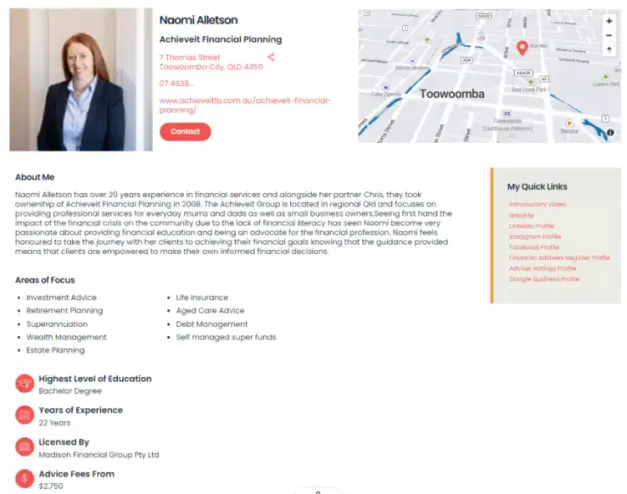
Maximise your profile
Members are encouraged to complete their profile in the FAAA Portal under the ‘Find a Planner Profile’ tab. Below you will find some helpful information and guidance.
- The FAAA team is committed to helping you achieve the best quality leads through your new optimised profile. If you have any questions, please reach out to communications@faaa.au or submit an online enquiry.
Guidance
Listing Logic
Find a Planner intuitively displays results to the end user on a best match basis, taking into account location and selected filters. Profiles with a more complete data set are also prioritised in the results listing to enhance the user experience. As a result, we encourage you to fully populate your profile. Note that if you choose to leave a field blank, that field won’t appear on your profile record. The following fields are considered beneficial and count towards your ‘profile completeness’ score and subsequent listing position; address, email address, phone number, bio, company name, headshot, highest level of education, meeting options, LinkedIn quick link, introductory video quick link and FAR quick link. These fields are marked ^ in the FAAA Portal. Any profiles that have the same compatibility based on filtering and profile completeness score will be listed randomly.
Your Address
Please ensure your business address is up to date so that its geographical location is correct. PO Boxes will not return accurate results.
ASIC Data
A number of fields (such as years of experience, licensee and status) are imported directly from ASIC’s FAR. These fields are not editable and if data is incorrect, we advise that you get in touch with your licensee to update. ASIC data is synced with Find a Planner on a weekly basis so please allow for a short delay in your profile being updated.
Eligibility
FAAA members in the following categories are eligible for a Find a Planner profile; CERTIFIED FINANCIAL PLANNER® professionals, Financial Planner AFP® and Practitioners. Members must also have an active status on the Financial Advisers Register (FAR). If you hold a Provisional Planner membership and your status on the FAR has changed to now show Financial Adviser (rather than Provisional), congratulations – please contact us to update your record.
Top tips for completing your profile
Bio
Click to read
The ‘About me’ section of your profile is your opportunity to showcase what makes you different and why a client may wish to consider you as their trusted financial advice professional. We advise that this section should be no longer than 300 words and written in a friendly tone of voice. The new keyword function will allow consumers to search for terms that are most important to them. A huge benefit of this functionality is that you can appeal directly to your target audience and terms they may be likely to search for. Examples include; ‘women focused advice’, ‘millennial focused advice’, ‘I’m an Indigenous Australian’, ‘I identify as part of the LGBTQI+ community’. Don’t forget to run a spelling and grammar check before publishing!
Please note that special characters, emojis and links will not be displayed in this section of your profile. You can insert a bulleted list by using paragraph breaks and ‘-‘ or ‘*’ if required.
Quick links
Click to read
Similar to the keyword search, this functionality has been introduced to support you in personalising your profile. Make the most of it by including links to your various platforms. Make sure to include the leading ‘https://’. For the introductory video we recommend uploading this to YouTube and pasting the link in your profile. For the Google review profile, simply navigate to your business listing on Google, click ‘view reviews’ and after the pop-up has appeared copy this URL and paste it in the field.
Headshot
Click to read
Please upload a square headshot (1:1) in png. or jpg. format. Recommended size – 285px by 285px (max 200KB – if larger it will impact load speed and engagement with consumers). If you require assistance resizing your headshot please email a high res original to communications@faaa.au. To minimise the potential for your image to be used fraudulently, we recommend using an image that doesn’t look like an ID-type photo. Some suggestions include: smile, turn your body so that you are not square on or looking directly at the camera.
Areas of Focus
Click to read
There are 15 Areas of Focus that you can choose to display on your profile. Please see below, including the additional commentary that end users see on the public directory to help them narrow down their search.
- Aged care – including funding strategies and Government assistance
- Cashflow management – including budgeting and making the most of your money
- Debt management – including debt recycling and strategies to reduce debt
- Divorce – including managing the proceeds of settlement
- Employment changes – including redundancy, job changes and salary sacrifice
- Estate planning – including wills, philanthropy and binding death nominations
- Government assistance – including Centrelink and ATO, NDIS
- Investments – including ethical investments and investment strategies
- Life & personal insurances – including income protection, TPD, trauma and claims management
- Retirement – including pre-retirement, transitioning to retirement and the pension phase
- SME advice – including succession planning and key man risk insurance
- Self managed super funds – including establishment and winding up of SMSF and investment strategies
- Superannuation – including asset allocation, consolidation, and contribution strategies
- Tax strategies
- Wealth management – including inheritance and investments outside of super
Languages
Click to read
There are now 19 languages that you can add to your profile to appeal to different audiences. English is assumed and therefore there is no English option to select.
Additional address
Click to read
We understand that some members practice from more than one location, with the new tool you’ll be able to record a secondary address. If this is the case for you, be sure to populate the new field.
Enquiries
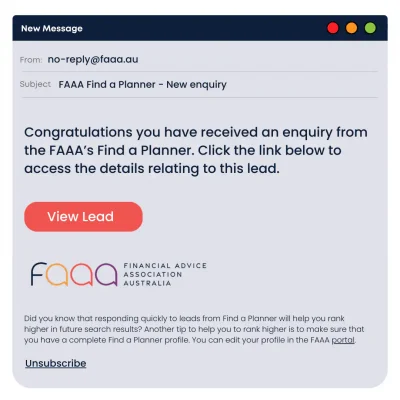
To ensure that you receive new enquiries please add no-reply@faaa.au to your address book to prevent these going to spam.
Please see example enquiry, emails that you receive will be from a sender name of ‘FAAA Find a Planner’ and will read ‘Congratulations you have received a new enquiry from the FAAA’s Find a Planner. Click the link below to access the details relating to this lead’ followed by a ‘View Lead’ button’.
If you have any questions relating to the authenticity of an email from the FAAA please do not click any links or respond, simply forward the original to contact@faaa.au and we will be more than happy to confirm in advance of you taking any action.
Protecting your data
Locator tools are commonly a target of bots focused on harvesting detailed information. The Find a Planner tool mitigates this by:
- Built-in technology that blocks manual and automated content farming by systematic searching.
- Facilitating Google Recaptcha on our forms to prevent unauthorised automated interaction with the locator.
- Using Firewall with Bot Control tools to monitor bot activity and to block particularly malicious threats.
Enquries that are sent to members are closely monitored internally via our dashboard. If you have any concerns regarding an enquiry or its authenticity please reach out at communications@faaa.au.
FAQs
Do I have to be an FAAA Member to have a Find a Planner profile?
Yes, this is strictly a benefit for FAAA members in the following categories; CERTIFIED FINANCIAL PLANNER® professional, Financial Planner AFP® and Practitioners.
If I have opted out of Find a Planner previously, how do I opt back in?
You can very easily opt in and out of Find a Planner at any time by accessing the ‘Find a Planner profile’ tab in the FAAA Portal.
Why are you asking me to list the cost of my advice fees?
This is an optional field and its purpose is to improve the quality of leads received – allowing the consumer to understand the potential costs for your service. If you elect to leave this blank, the field will not appear on your Find a Planner profile.
If I only provide virtual advice can I still benefit from a Find a Planner Profile?
Yes, those who only provide virtual advice can select ‘Virtual Only’ as their meeting option. If you do not have a business address (in the case where you work from home) we recommend adding the suburb, city, postcode and country as your address to ensure you are shown in the correct geographical location. Profiles without a this information will not be shown on the map.